

Preconstruction teams make critical decisions every day: what to carry forward, what to adjust, where to allocate dollars, what to flag, and what to communicate back to owners and project stakeholders. When those decisions live across too many disconnected places, the work gets harder, context gets lost, and teams spend more time chasing information than moving projects forward.
ConCntric brings preconstruction decisions, data, and workflows into one connected system. In Q2, we released a wide range of platform expansions designed to help teams move from insight to action faster, with stronger connections between cost, scope, documents, contingency, reporting, and AI-powered workflows.
Here are the highlights.
A true system of record for cost decisions
Cost movement should not be a mystery. One of the biggest areas of focus this quarter was helping teams capture the full history behind cost decisions: what changed, why it changed, where the dollars moved, and how those decisions impact the estimate over time.
With the release of Contingency Manager, teams can now visualize contingency buckets, fund additive value option items directly from contingency accounts, and track contingency drawdown over time. Instead of relying on static spreadsheet tabs or manual assumptions, teams have a clearer system of record for where contingency dollars are moving and why.
We also introduced Estimate Revisions, making it easier to incorporate approved value option items directly back into an estimate. This gives teams a clearer accounting record of approved changes between milestones and helps preserve the connection between a decision, its cost impact, and the estimate it affects, with the full decision history instantly available whenever teams need it.
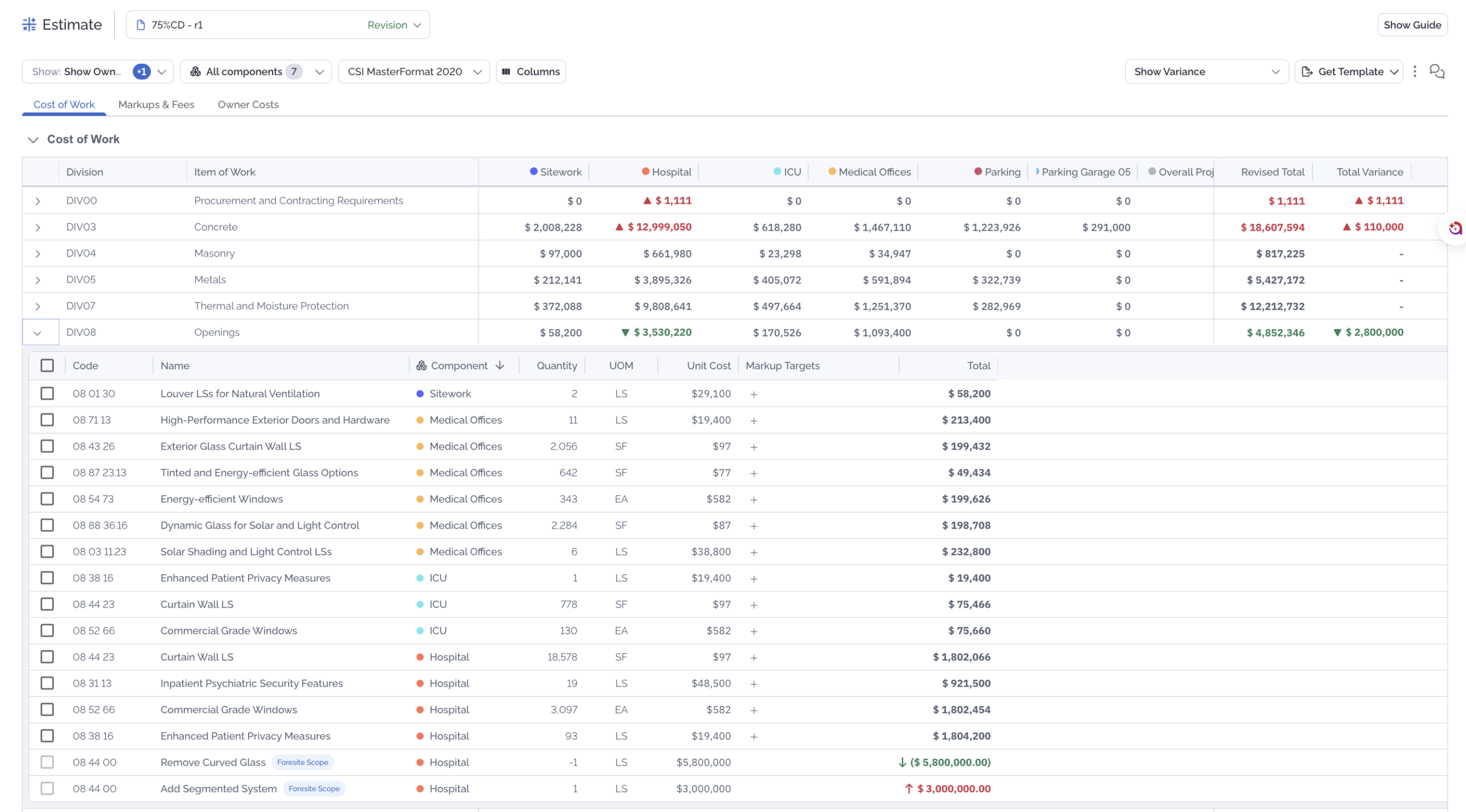
Additional estimating enhancements include:
- Expanded variance comparisons and reporting
- Comments on estimate line items to support clearer communication and collaboration
- Targeted markup application, allowing teams to apply markups to specific cost groups
Together, these updates help teams spend less time rebuilding the story behind cost movement and more time making the next decision with confidence.
Bringing documents, markups, and project context into one place
Some of the most important preconstruction decisions start small: a redline, a markup, a note in the margin. In Q2, ConCntric made that context easier to capture, connect, and keep inside the project record.
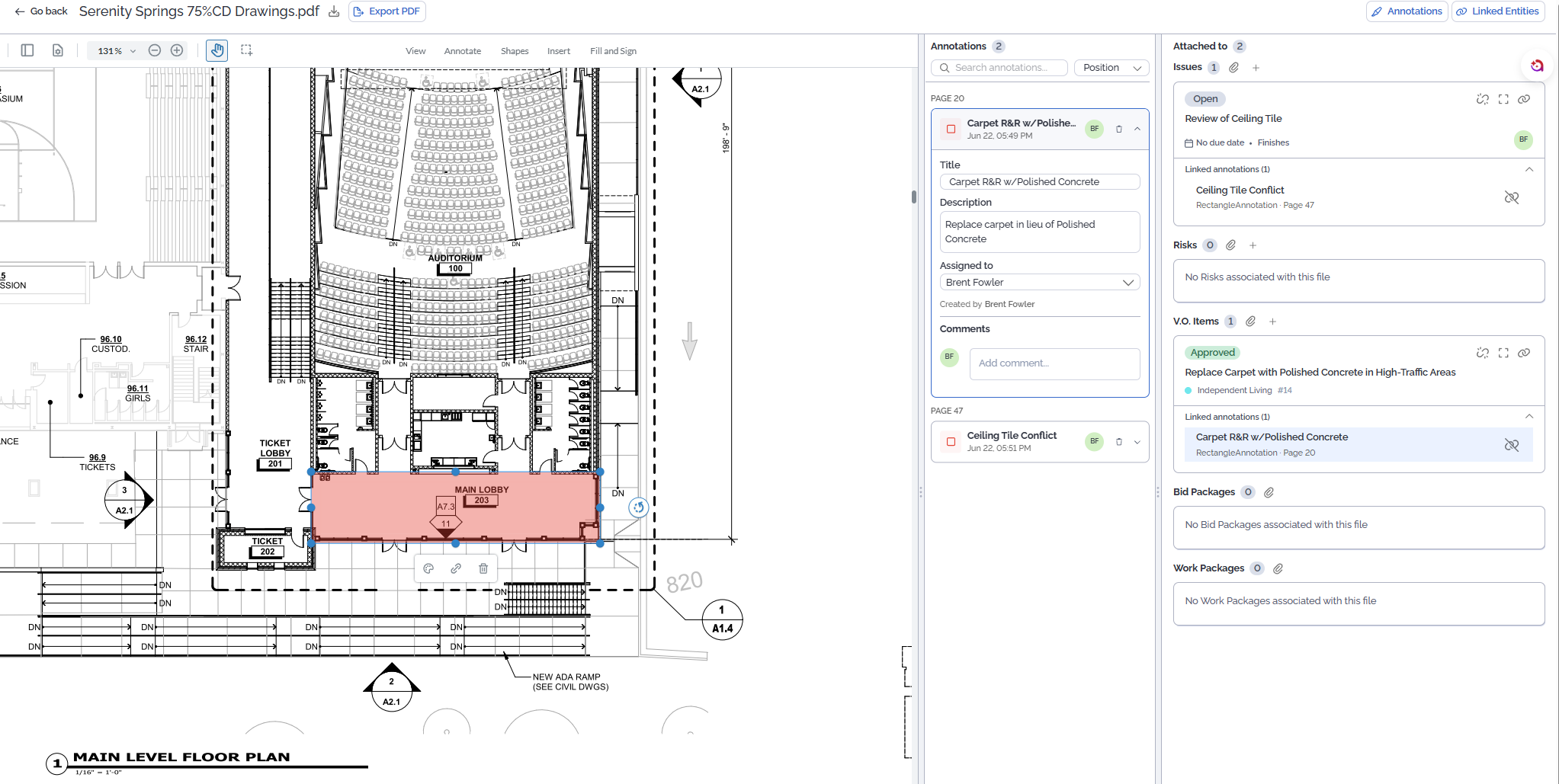
The new Content Viewer allows users to open files directly in-platform instead of downloading documents into a separate tool. Teams can view attachments, add markups, create annotations, and link document context directly to related risks, issues, and value option items.
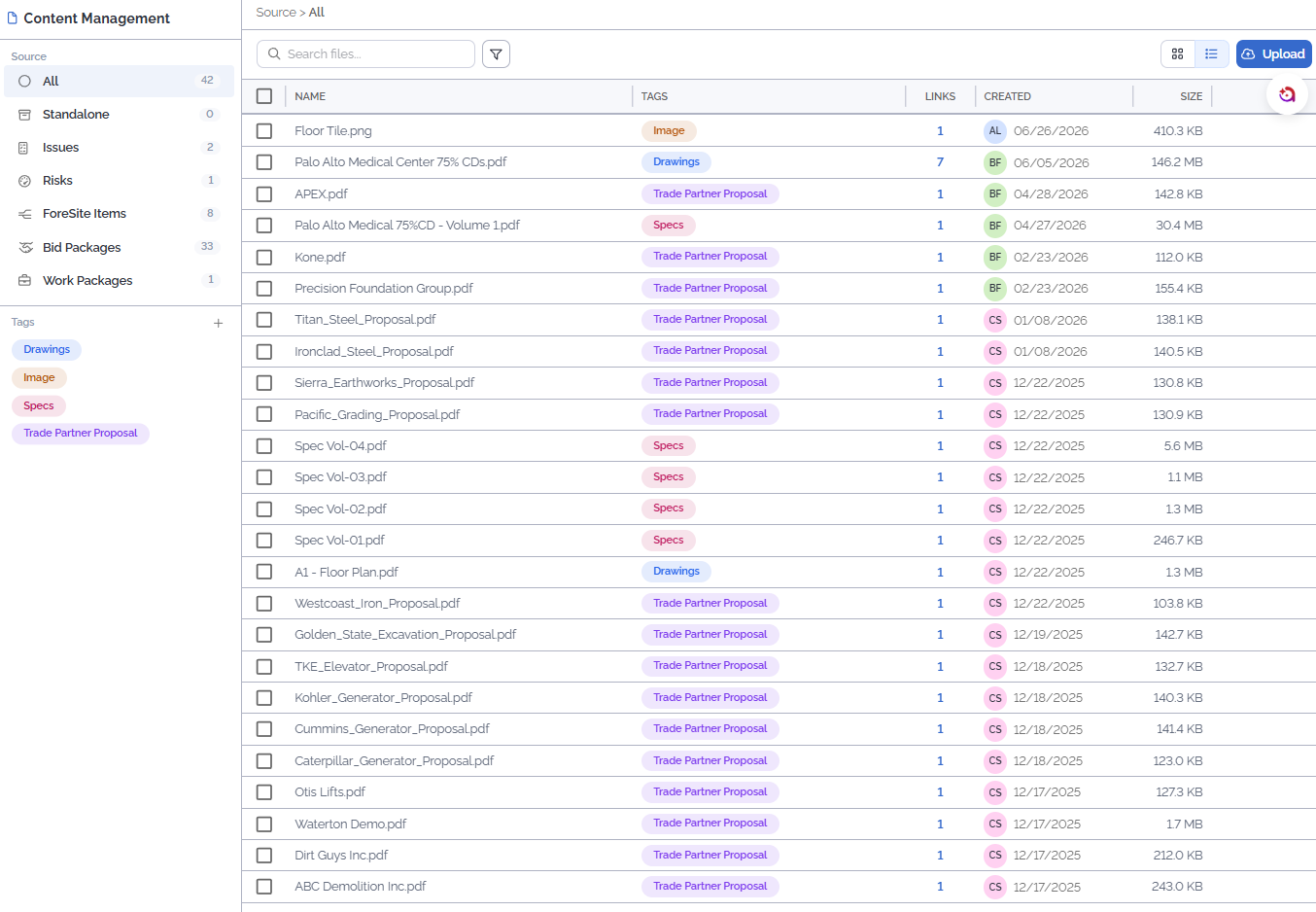
With Content Management, teams now have a more centralized way to organize, tag, and manage project files. New functionality includes multi-select actions, support for additional file types, bid and work package entities, and the ability to import existing document markups from wherever you run your design reviews today.
Drawings drive decisions. Decisions drive cost. By connecting documents, markups, risks, issues, and value option items inside ConCntric, teams can keep that chain intact instead of chasing context later.
Making value engineering more flexible and reusable
ForeSite updates made value engineering more flexible and easier to carry forward across projects. Teams can now create value option items that impact multiple components, reducing duplicate entries and making it easier to manage scope changes that affect more than one area of a project.
We also expanded the ForeSite Idea Library with implementation views, giving teams more visibility into how ideas have been used across projects. Instead of recreating value engineering ideas from scratch, users can reference prior implementations, including scope details and coding, and apply that context to future projects to more efficiently leverage historical cost savings.
Additional collaboration enhancements now allow multiple team members to stay connected to ForeSite items, risks, and issues through collaborators. This keeps the right people informed without diluting accountability.
Expanding Amplify AI across real preconstruction workflows
Amplify continued to expand in Q2, with a focus on helping teams act on larger data sets, reduce manual updates, and generate useful outputs from structured project information.
New and expanded Amplify capabilities include:
- Conceptual estimate and ROM generation using historical project data
- Faster, more reliable answers across larger project and portfolio data sets
- Bulk updates to custom attributes and component OmniClass categories
- Expanded AI connectivity, giving technical teams more flexibility to use ConCntric data with their preferred AI tools
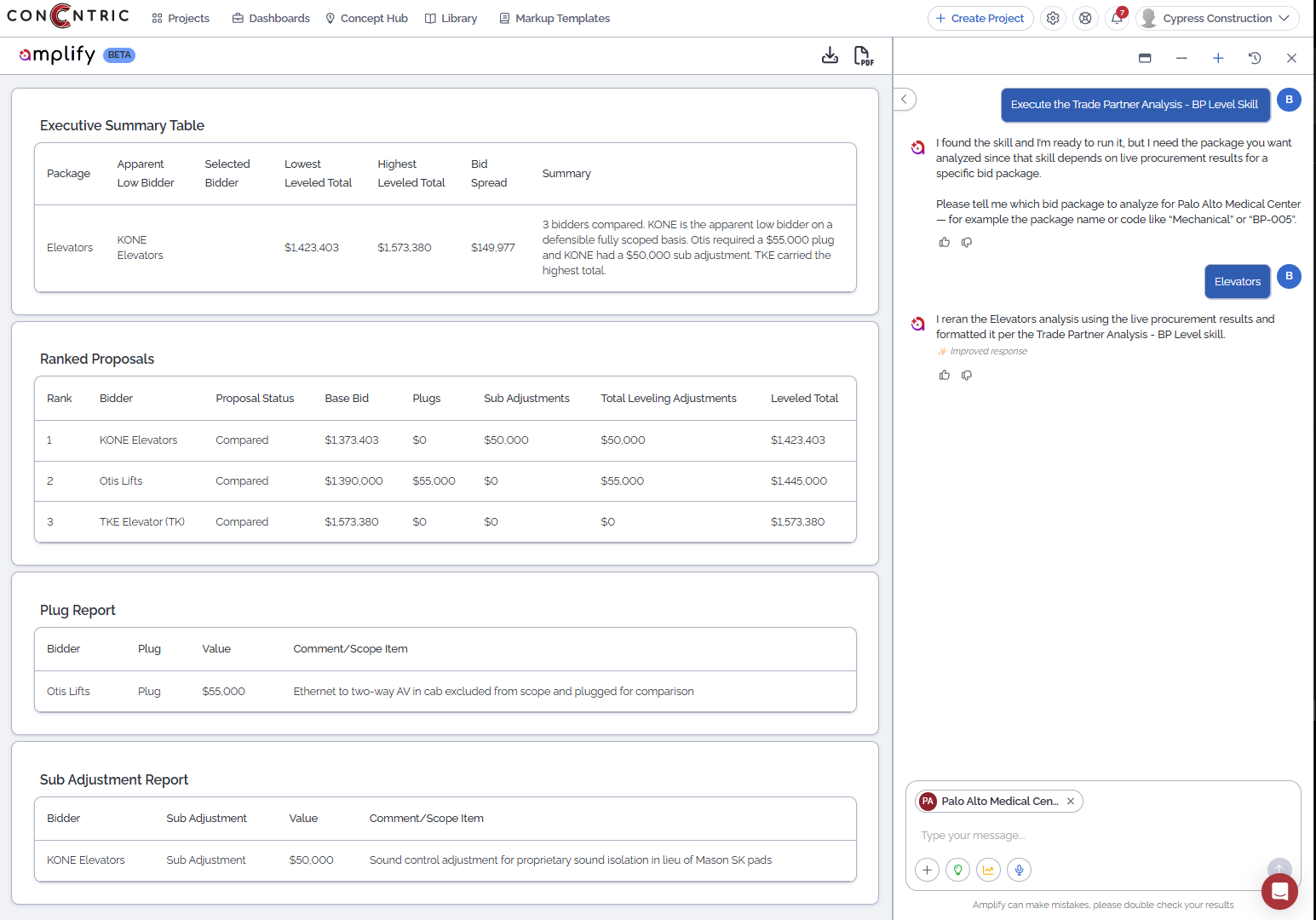
This is not AI for the sake of AI. It is AI working inside a structured preconstruction platform, where your real project data, context, and workflows already live.
Strengthening enterprise data access, visibility, and reporting
Q2 also included several updates that support enterprise-grade transparency and data access.
The Public API now includes expanded capabilities for list endpoints, entity retrieval and updates, timestamp filtering, soft-deleted records, audit log access, and content management. These enhancements give teams more flexibility to connect ConCntric with the systems and workflows already operating across their organization.
We also added an in-platform Audit Trail, giving account administrators greater visibility into user activity and changes across the platform.
Reporting continued to expand as well, with new and improved report cards, in-platform report previews, expanded chart coverage, and cleaner external reporting outputs. These updates help teams share the right information with the right stakeholders without having to rebuild visuals or recreate reports outside the platform.
The everyday improvements matter too
In addition to the larger releases, Q2 included a wide range of enhancements that improve day-to-day usability and data visibility, including:
- Amplify-driven suggestions for default project comparisons in Calibrate
- Expanded Calibrate metrics in Project Overview
- Simplified component module
- Tracking GSF and unit counts for excluded components
- View-only access to timeline event details and attachments
- Show/hide target and stretch goal settings in Vision
- Saved views in Issue Management and Risk Register
- Show/hide all columns across more tables
- General performance enhancements across ForeSite and Estimate Register
- Multi-subcontractor bid leveling approval flows in Procurement
Some updates are big, visible releases. Others are the improvements users feel in the flow of daily work: fewer clicks, cleaner views, faster answers, and more confidence in the data. Both matter.
Built for the way preconstruction teams actually work
The common thread across Q2 is connection.
Cost decisions connect back to estimates.
Contingency connects to approved value option items.
Documents connect to risks, issues, and scope decisions.
AI connects to structured project data.
Reports connect platform insights to stakeholder conversations.
APIs and audit trails connect ConCntric to broader enterprise workflows.
That is what a true preconstruction system of record requires: not just storing information, but connecting the decisions, dollars, documents, and workflows that shape project outcomes.
ConCntric’s product and engineering teams continue to move quickly, but with purpose: listening to customer feedback, identifying the workflows that create the most friction, and turning that feedback into practical product improvements.
For customers, many of these updates are available in-platform today. Log into ConCntric or contact your CSM to learn more about how to best leverage these features for your workflows.
Interested in learning more about ConCntric? Visit our website or schedule a demo to see how ConCntric helps preconstruction teams connect data, decisions, and workflows in one place.
