

Preconstruction teams are asked to explain contingency movement all the time. A value option gets approved here. A scope gap gets covered there. Design development pushes an estimate forward… And before long, the question comes up in a budget review: what contingency was used, what decision caused the draw, and what is left?
That should be an easy answer. But for many teams, it still takes a lot of digging.
Design contingency alone can represent 5-10% of total project cost. On a large project, that is a meaningful reserve. It is also one of the most active parts of the budget during preconstruction, especially as scope is clarified, estimates are updated, and decisions are made with ownership and design partners.
The issue is not that contingency is being used. That is what it is there for. The issue is that the backup often lives in too many places: spreadsheets, meeting notes, estimate files, email threads, and conversations that happened months ago.
The Current Way: Rebuilding the Contingency Story After the Fact
Most preconstruction teams know when contingency has been used. The harder part is proving where it went. A scope item gets approved. A value option moves forward. A design gap gets covered. Then someone has to remember to update a spreadsheet, adjust a tracker, capture the reasoning, make a note for the next OAC, or explain the change at the next milestone review.
So when a stakeholder asks what happened to design contingency, the team has to go backward. They compare estimate versions, they check meeting notes, and they hopefully find the right spreadsheet. They even ask around for the reasoning behind decisions that may have happened several milestones ago.
Those questions are answerable, but they take work. And usually, that work happens when time is tight and the budget conversation is already under pressure.
The result is a lot of manual reconciliation for something that should already be part of the project record.
The New Way: A Live Record of Contingency Draws
ConCntric’s Contingency Management in ForeSite gives teams a clearer way to track those draws as decisions are made. With Contingency Management, the record is already there. ConCntric’s first release focuses on Design Contingency because that is the reserve most closely tied to preconstruction scope movement. It is where design development, estimate updates, and approved scope decisions all come together.
When a scope change or value option is approved in ForeSite, the team can document which contingency reserve funded it, how much was used, who approved the draw and why. That draw is captured at the time the decision is made, not months later when someone is trying to reconstruct the trail.
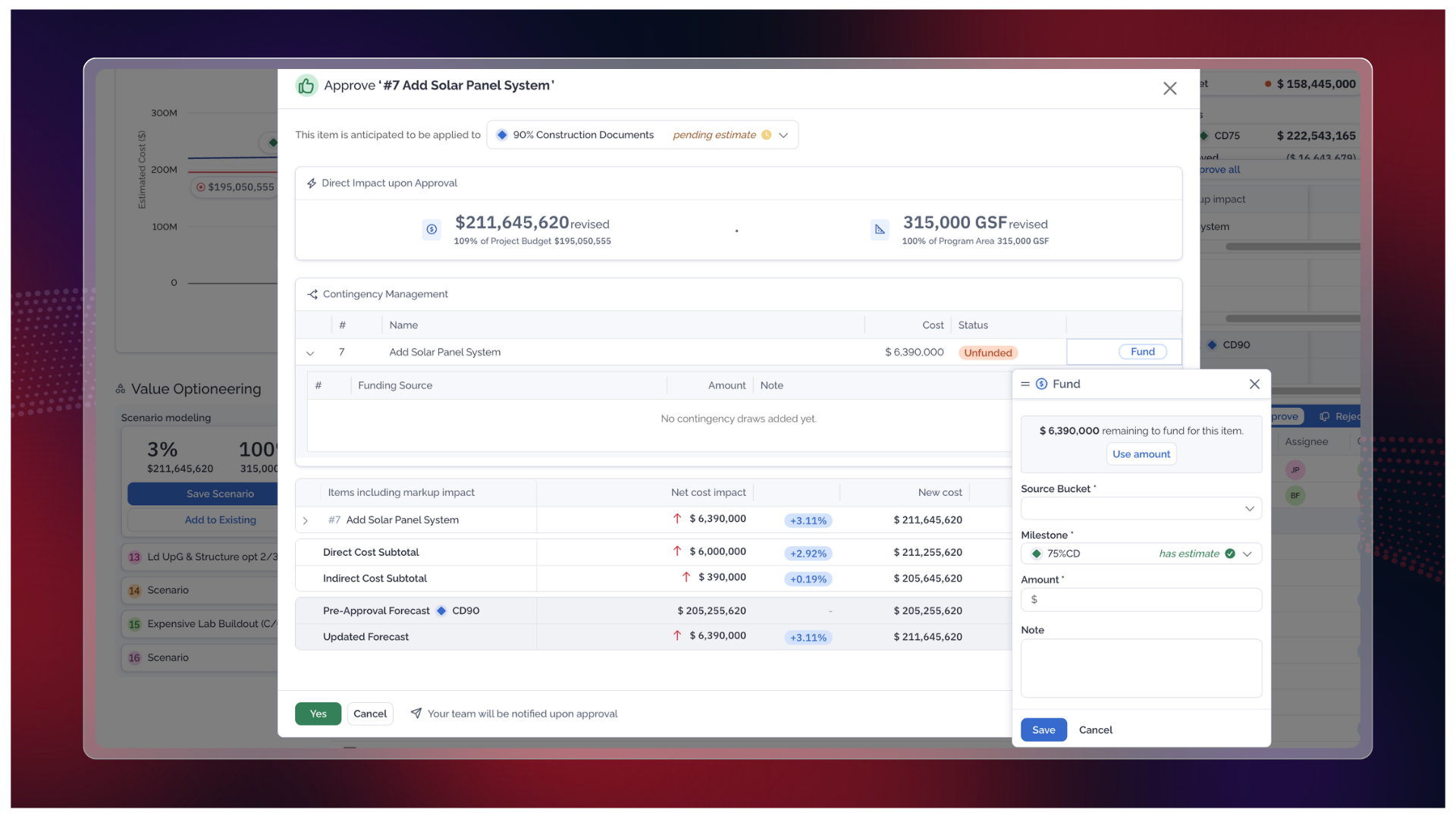
With Contingency Management, each approved draw is added to a transaction ledger, creating a clear history tied directly to the scope decisions that consumed the reserve. Teams can see which approved items drew from design contingency, how much each one used, who approved it, why it was used, and what balance remains.
When a new estimate is uploaded, Contingency Management also flags changes between the previous contingency forecast and the updated estimate value, so teams can acknowledge the delta instead of letting it disappear between milestones.
That changes the conversation. Instead of saying, “Let’s go back and pull the backup,” the team can say, “Here is what was funded, when it was approved, why it was approved, and what is still available.”
That is a different kind of budget conversation.
Built for the Way GC Precon Teams Actually Work
As scope decisions are approved in ForeSite, Contingency Management captures the funding history behind them, so the backup is built into the project record from the start.
That matters because preconstruction is not a straight line. Estimates change, scope moves, design develops, and priorities shift. And over an 18- to 24-month preconstruction process, hundreds of small decisions can shape the budget.
When those decisions are not connected to the contingency they consume, the budget story gets harder to explain. ConCntric built Contingency Management to keep that connection intact. It gives project teams a clear view of what has been drawn from design contingency, what is still available, and how the reserve has changed across estimate milestones. It also gives leadership a cleaner read on project health without asking the team to rebuild the history every time there is a budget review.
Looking Ahead
Design Contingency is the first release, but contingency touches more than design development.
Over time, Contingency Management can connect to additional preconstruction workflows, including procurement, buyout contingency, risk items, and design management.
That matters because teams need a clearer way to track not only where contingency is used, but also where dollars are saved. At the bid package level, for example, better visibility into savings can help GCs track contingency more accurately and work with their customers to improve project outcomes.
As Contingency Management continues to evolve, the goal is to give teams more detail and traceability without adding more manual effort, helping surface the full picture of every dollar used or saved.
Less Digging. Better Backup. Clearer Budget Conversations.
Contingency is meant to help teams manage uncertainty, but managing the contingency itself should not create more uncertainty.
With Contingency Management, teams get a live ledger of design contingency usage tied directly to approved scope decisions in ForeSite. Draws are documented as they happen, balances stay current, and estimate changes are flagged and acknowledged. And the history is available whenever the team needs it.
Because when someone asks where the contingency went, the answer should not depend on a spreadsheet, an old email thread, or one person’s memory. It should already be in the record.
